Authentication
Get an API key
You SHALL authenticate to the Diduenjoy API by providing your secret API key in the request. Your API keys carry many privileges, so be sure to keep them secret!
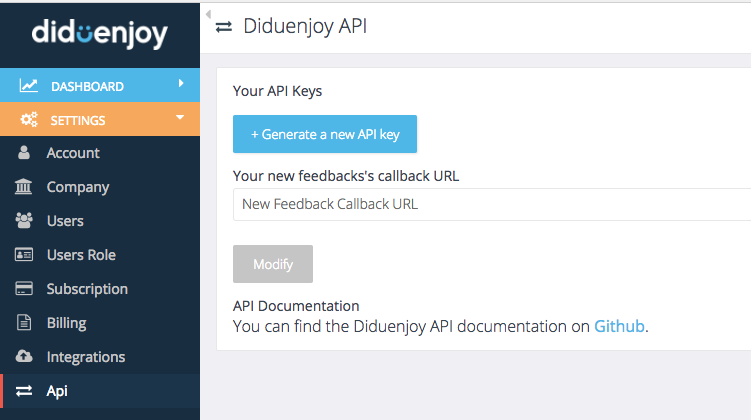
You can find and generate your API keys in the Settings>API page in your diduenjoy dashboard.
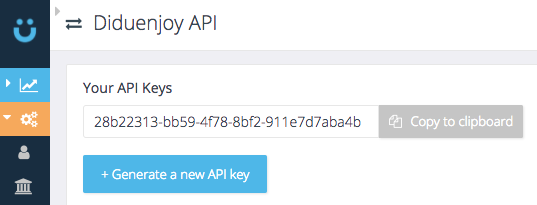
If you dont have any generated Api key you can create a new one with the + Generate a new API key button.
Auth with API key
Authentication to the API occurs via HTTP Basic Auth. Provide your API key as the basic auth username. You do not need to provide a password.
Example request
- Rails
- cURL
require 'net/http'
require 'net/https'
require 'uri'

uri = URI('https://api.diduenjoy.com/api/v1/companies')

Net::HTTP.start(uri.host, uri.port,
:use_ssl => uri.scheme == 'https',
:verify_mode => OpenSSL::SSL::VERIFY_NONE) do |http|

request = Net::HTTP::Get.new uri.request_uri
# keep empty second params
request.basic_auth 'API_KEY', ''

response = http.request request # Net::HTTPResponse object

end
curl 'https://api.diduenjoy.com/api/v1/companies' \
-u 'API_KEY:'
note
You SHALL replace API_KEY with your personal API key.
Diduenjoy expects all API requests to have the Base64 encoded API key in the Authorization header
Authorization: Basic BASE64_API_KEY